What Size Should a QR Code Be? A Print Size Guide
The honest answer is that it depends on how far away people will be standing. There is a simple rule that gets you close, and a few adjustments that matter more than the rule.
The 10:1 rule
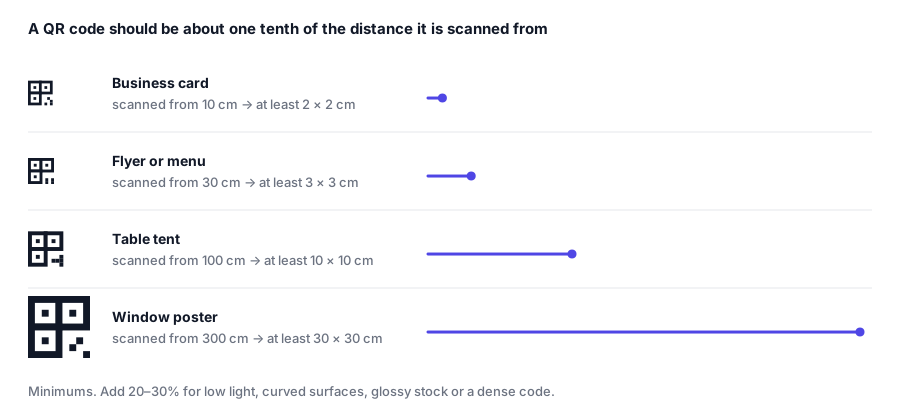
A QR code should be roughly one tenth of the distance it will be scanned from.
| Scanned from | Minimum code size |
|---|---|
| 10 cm (business card) | 2 x 2 cm |
| 30 cm (flyer, menu) | 3 x 3 cm |
| 1 m (table tent, shelf label) | 10 x 10 cm |
| 3 m (window, poster) | 30 x 30 cm |
| 10 m (large signage) | 1 x 1 m |
| 20 m (billboard) | 2 x 2 m |
The rule is a floor, not a target. Going 20-30% larger costs almost nothing in print and buys a lot of reliability.
The absolute minimum
2 x 2 cm. Below that, most phone cameras cannot resolve individual modules at a comfortable arm’s length, no matter how good the print is. Some sources will tell you 1.5 cm works; it does, on a new phone, in good light, with a short URL. It is not a size to design around.
When to go bigger than the rule says
Add 20-30% for each of these:
- Low light - restaurants, bars, evening events.
- Curved surfaces - bottles, cans, cups, cylindrical packaging.
- Glossy or laminated stock - reflections wash out the pattern.
- A dense code - a long vCard needs more physical space per module than a short URL.
- An older audience - older phones have worse cameras and steadier hands are rarer.
- Moving readers - a code on a vehicle or in a transit station gets a fraction of a second of attention.
These stack. A dense vCard on a glossy curved bottle in a dim bar wants to be several times the rule-of-thumb size.
Resolution: what to export
Physical size and file resolution are different problems. Getting the size right and the resolution wrong still produces an unscannable code.
- For print, export SVG. It is vector: infinitely sharp at any size, and it is what every print shop would rather receive. This is the single highest-value choice on this page.
- If you must use PNG, supply at least 300 DPI at the final printed size. A 5 x 5 cm code at 300 DPI is about 600 x 600 px. A billboard needs vector - do not try to solve it with pixels.
- For screens, 512 px is plenty for most uses, 1024 px if it might be zoomed.
Our editor exports SVG, PNG, JPG and WebP, with size presets up to 4096 px.
Make the code less dense instead
Physical size is only half the equation. The other half is how many modules the code has, and you control that:
- Shorten the URL.
example.com/xproduces a far coarser grid than the same link with four tracking parameters. - Trim optional vCard fields. Postal addresses and free-text notes are the usual culprits.
- Do not raise error correction beyond what you need. Level H adds robustness and modules; Q is the right default for most print.
A shorter payload means fatter modules at the same physical size, which means it scans from further away. Often it is easier to shorten the content than to negotiate more space in the layout.
Quiet zone
Whatever size you choose, leave clear margin around the code - about 8-10% of its width on all four sides. Designers routinely crop into it to make a layout balance, and it is a common cause of codes that scan on screen but not in print.
Testing before the print run
Print one proof at final size, on the actual stock, and scan it:
- from the distance people will really stand at
- in the lighting the code will actually live in
- with two different phones
If it hesitates, go up a size. Reprinting 5,000 flyers costs considerably more than making the code 20% bigger the first time.
Ready to make one? Start with a free QR code and export SVG for print.